



Trip reset
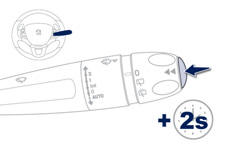
When the trip required is displayed, press the control for more than two seconds or use the left hand thumb wheel of the steering mounted controls.
Trips "1" and "2" are independent but their use is identical.
For example, trip "1" can be used for daily figures, and trip "2" for monthly figures.
See also:
Letting your body drive
Out on the road, you soon become aware that the small steering wheel does
dominate much of the experience. You don’t need to twirl your arms as much. You
feel like a racing driver on B-roads, neve ...
Peugeot 208 Review
Peugeot's numbering system means you always know where you are in its pecking
order: 107, 208, 308, 508, 3008, 4007, 5008… The higher the number the bigger
the car. But there are two inexplicable ...
Horn
Audible warning system to alert other road users to an imminent danger.
Press the central part of the multifunction steering wheel.
Use the horn moderately and only in the following circumstances: ...